PKR BET Easypaisa Guide for Pakistani Users
Easypaisa has changed the way many people in Pakistan manage online payments. Instead of visiting a bank branch, you can transfer money, pay bills, and complete digital transactions directly from your smartphone.
If you want to use PKR BET Easypaisa for deposits or withdrawals, understanding the process before you start can save time and help you avoid unnecessary payment issues.
This guide explains the advantages of Easypaisa, how to deposit and withdraw funds, what to expect regarding fees and processing times, and how to solve common transaction problems. Whether you use Easypaisa every day or you’re trying it for the first time, you’ll find practical advice that makes the process easier.
Benefits of Easypaisa Payments
Many Pakistani users choose Easypaisa because it offers convenience without adding unnecessary complexity.
Simple Digital Payments
You can send or receive money directly from your mobile wallet. The process takes only a few steps, making it suitable for users with different levels of experience.
Convenient Mobile Access
Your wallet stays available wherever you have internet access. You can manage payments without visiting an agent or bank branch.
Easy Account Management
The Easypaisa app allows you to review recent transactions, monitor your wallet balance, and manage payments from one place.
Wide Acceptance
Many online services in Pakistan support Easypaisa, giving users flexibility when choosing a payment method.
Better Payment Tracking
Every completed transaction creates a digital record. Keeping these records makes it easier to monitor deposits, withdrawals, and account activity.
How to Deposit Using Easypaisa?
Adding funds through Easypaisa becomes much easier when you follow a clear process.
Step 1: Sign In
Login to your PKR BET account using your registered credentials.
Step 2: Open the Deposit Section
Navigate to the payment area and choose the deposit option.
Step 3: Select Easypaisa
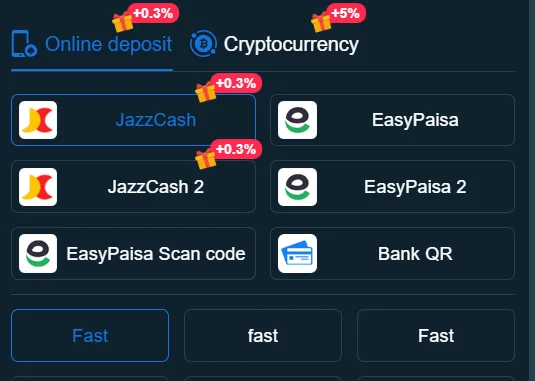
Choose Easypaisa from the available payment methods.
Step 4: Enter the Deposit Amount
Type the amount you want to transfer.
Review the amount before moving to the next step.
Step 5: Complete the Payment
Authorize the payment through your Easypaisa wallet.
Keep the payment window open until you receive confirmation.
Step 6: Confirm Your Balance
Refresh your account and check whether the deposited funds appear successfully.
Helpful Deposit Tips
- Use a verified Easypaisa account.
- Double-check the transfer amount.
- Save the payment confirmation.
- Wait for the transaction to finish before attempting another payment.
These simple habits reduce the chance of duplicate transactions and payment confusion.
How to Withdraw to your Easypaisa Account?
You can also receive funds through your Easypaisa wallet if the platform supports this payment option.
Step 1: Open the Withdrawal Page
Log in and visit the withdrawal section.
Step 2: Choose Easypaisa
Select Easypaisa as your preferred withdrawal method.
Step 3: Enter Your Withdrawal Amount
Choose an amount that meets the platform’s withdrawal requirements.
Step 4: Confirm Your Wallet Information
Review your registered Easypaisa number carefully.
Even one incorrect digit can delay your payment.
Step 5: Submit Your Request
Review your information one final time before confirming.
Step 6: Monitor Your Request
Check your account history until the transaction reaches your Easypaisa wallet.
If processing takes longer than expected, review your account notifications before contacting customer support.
Fees & Processing Times
Processing times may vary depending on several factors, including payment provider activity, account verification status, and transaction volume.
Before making a payment, consider the following:
Review Any Applicable Fees
Some payment providers may charge service fees depending on the transaction type or amount.
Check the latest fee information before confirming your payment.
Understand Processing Times
Most transactions finish quickly, but several situations can increase processing time.
These include:
- System maintenance
- High payment volume
- Banking holidays
- Additional account verification
Avoid sending another payment while your first transaction remains in progress.
Keep Transaction Records
Save every payment confirmation until your account reflects the completed transaction.
These records help customer support investigate payment issues more efficiently if needed.
Troubleshooting
Most Easypaisa payment problems have straightforward solutions.
Deposit Doesn’t Appear
If your deposit doesn’t show up:
- Confirm that Easypaisa completed the payment.
- Review your transaction history.
- Refresh your account after several minutes.
- Contact customer support if the delay continues.
Withdrawal Still Processing
If your withdrawal remains pending:
- Verify your Easypaisa number.
- Confirm your account information.
- Review any verification requests.
- Wait for the expected processing period.
Incorrect Wallet Information
Entering the wrong wallet number often causes unnecessary delays.
Review every payment detail before confirming your request.
Payment Interrupted
Network interruptions may interrupt a payment before completion.
Check your wallet history before starting another transaction.
If the payment completed successfully, avoid making a duplicate payment.
Unable to Complete Payment
Several factors may prevent successful transactions.
Examples include:
- Insufficient wallet balance
- Temporary network issues
- Incorrect payment details
- Service maintenance
Resolve the issue first before submitting another payment request.
Frequently Asked Questions
Yes. Many Pakistani users choose Easypaisa because it offers a convenient way to manage deposits and withdrawals.
Log in to your account, choose Easypaisa, enter the deposit amount, authorize the payment, and confirm that your balance updates successfully.
Visit the withdrawal section, select Easypaisa, enter your wallet information, choose your withdrawal amount, and submit your request.
Transaction volume, account verification, payment provider processing, or temporary technical issues may increase processing time.
Yes. Keeping transaction records helps you resolve payment questions more quickly if an issue occurs.
Using your own wallet helps prevent verification problems and supports smoother payment processing.
Insufficient balance, incorrect wallet information, or temporary service interruptions commonly cause payment failures.
Review your account details, confirm your wallet information, and contact customer support if the processing time exceeds the expected period.
Protect your wallet PIN, use trusted internet connections, review payment details before confirming, and monitor your transaction history regularly.
Continue Exploring PKR BET
Looking for more helpful resources? Continue with these guides:
Together, these guides explain every stage of account management and help you complete online transactions with greater confidence.