How to Use JazzCash on PKR BET
JazzCash has become one of the most convenient payment methods for online users in Pakistan. Its simple interface, quick transfers, and wide availability make it a popular choice for adding funds and requesting withdrawals on PKR BET.
This guide explains how to use PKR BET JazzCash safely and efficiently. You’ll learn how to make deposits, request withdrawals, understand transaction limits, solve common payment problems, and protect your account.
If you’re new to the platform, complete your PKR BET Registration and PKR BET Login before making your first transaction.
Why JazzCash Is Popular
Many Pakistani users prefer JazzCash because it offers a fast and convenient way to manage digital payments.
Here are a few reasons why users choose JazzCash:
Fast Transactions
JazzCash allows users to complete payments within minutes, making it a practical option for everyday online transactions.
Easy Mobile Access
You can access your JazzCash wallet directly from your smartphone without visiting a physical location.
Wide Availability
Thousands of agents across Pakistan support JazzCash services, making deposits and withdrawals more convenient.
User-Friendly Interface
The application offers a clean layout that helps users complete payments with only a few steps.
Secure Payment System
JazzCash includes several security features that help protect your wallet and payment information.
How to Deposit with JazzCash
Depositing funds through JazzCash is straightforward when you follow the correct steps.
Step 1: Log In
Sign in to your PKR BET account using your registered credentials.
Step 2: Open the Deposit Section
Navigate to the Deposit or Wallet section.
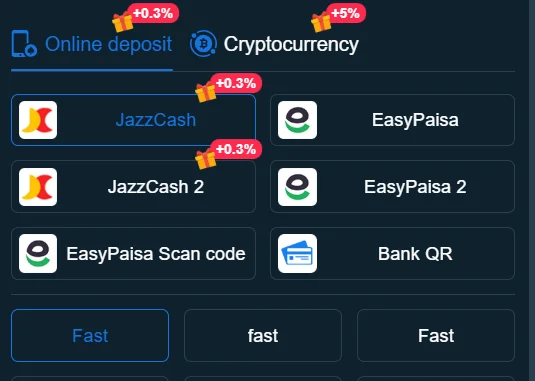
Step 3: Select JazzCash
Choose JazzCash from the available payment methods.
Step 4: Enter the Deposit Amount
Type the amount you want to deposit.
Review the amount carefully before continuing.
Step 5: Confirm the Payment
Complete the payment using your JazzCash wallet.
Wait until the payment confirmation appears before closing the page.
Step 6: Verify Your Balance
Refresh your account and confirm that your balance reflects the completed transaction.
Deposit Tips
- Use your own JazzCash account.
- Keep enough balance in your wallet.
- Save the payment receipt.
- Avoid making duplicate payments if processing takes longer than expected.
How to Withdraw with JazzCash
Withdrawing funds through JazzCash follows a similar process.
Step 1: Visit the Withdrawal Section
Log in and open the Withdrawal page.
Step 2: Choose JazzCash
Select JazzCash as your preferred withdrawal method.
Step 3: Enter the Withdrawal Amount
Type the amount you want to withdraw.
Confirm that it meets the platform’s minimum withdrawal requirement.
Step 4: Verify Your Wallet Information
Double-check your registered JazzCash number before submitting your request.
Step 5: Submit Your Request
Review your information carefully and confirm the withdrawal.
Step 6: Monitor the Transaction
Check your transaction history until the payment reaches your JazzCash wallet.
If your withdrawal takes longer than expected, review your account notifications before contacting customer support.
Transaction Limits
Every payment method usually includes minimum and maximum transaction limits.
Before making a deposit or withdrawal:
- Review the minimum deposit requirement.
- Confirm the minimum withdrawal amount.
- Check any daily transaction limits.
- Verify that your JazzCash wallet supports the requested amount.
Following these limits helps reduce payment delays and rejected transactions.
If you plan to transfer a larger amount, consider reviewing the latest limits inside your account before submitting your request.
Common Problems & Solutions
Most payment issues have simple solutions.
Deposit Not Received
If your deposit does not appear:
- Confirm that JazzCash completed the payment.
- Refresh your account after a few minutes.
- Keep your payment receipt.
- Contact customer support if the delay continues.
Withdrawal Pending
Several factors may delay withdrawals.
Common reasons include:
- Account verification requirements.
- Incorrect wallet information.
- Temporary payment processing delays.
- High transaction volume.
Review your account details before submitting another request.
Incorrect Wallet Number
Entering the wrong JazzCash number may delay your transaction.
Always review your wallet number carefully before confirming any payment.
Payment Failed
A failed payment may occur because of:
- Insufficient wallet balance.
- Temporary network issues.
- Incorrect payment information.
- Service interruptions.
Resolve the issue before attempting another transaction.
Duplicate Transactions
Avoid pressing the payment button multiple times.
Wait for the confirmation page before refreshing your browser or repeating the payment.
Security Tips
Protecting your account should remain a priority whenever you use JazzCash.
Use Your Own Wallet
Always complete transactions from a JazzCash account registered in your own name.
Keep Your PIN Private
Never share your JazzCash PIN, password, or verification code with anyone.
Verify Payment Details
Check the payment amount and wallet number before confirming every transaction.
Save Payment Receipts
Store your transaction receipts until your payment appears successfully in your account.
Monitor Your Transaction History
Review your account regularly to identify unexpected activity.
Report suspicious transactions immediately through the appropriate support channel.
Avoid Public Wi-Fi
Complete financial transactions only through trusted internet connections whenever possible.
Frequently Asked Questions
Yes. Many users choose JazzCash because it provides a quick and convenient payment option for deposits and withdrawals.
Log in to your account, select JazzCash, enter your payment amount, confirm the transaction, and verify your updated account balance.
Open the Withdrawal section, choose JazzCash, enter your withdrawal amount, verify your wallet number, and submit your request.
Payment provider delays, network issues, or temporary technical problems may affect processing times.
Verification requirements, incorrect wallet information, or payment processing delays may extend withdrawal times.
Many platforms require account verification before processing withdrawals. Completing verification early helps reduce delays.
JazzCash includes multiple security features, but you should also protect your account by using strong passwords, private PINs, and trusted devices.
Check your wallet balance, confirm your payment information, and try again after resolving any identified issues.
Using your own JazzCash account helps prevent verification issues and improves transaction security.