PKR BET Security & Account Protection Guide for Pakistani users
When people search “Is PKR BET safe?”, they usually want clear answers about protecting their account, personal information, and financial transactions. While no online platform can eliminate every risk, you can greatly improve your account security by following smart online habits and using the available protection features.
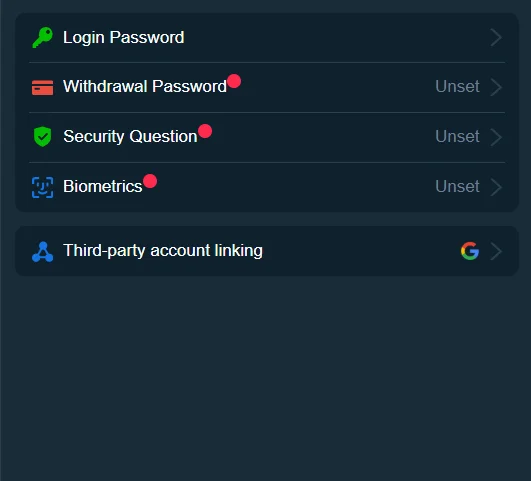
This guide explains how to keep your PKR BET account secure, create stronger passwords, protect your privacy, recognize suspicious activity, and make safer online transactions. It also includes responsible gaming tips to help you maintain healthy habits while using the platform.
Account Safety Features
A secure account starts with the tools designed to protect it. Learning how these features work helps you reduce the risk of unauthorized access.
Login Verification
Some accounts may require an additional verification step during sign-in. This extra check helps confirm that the person accessing the account is the legitimate owner.
Whenever a verification code arrives, enter it only on the official login page and never share it with anyone else.
Account Activity Monitoring
Make it a habit to review your recent account activity.
Look for:
- Unknown login attempts
- Unexpected password changes
- Unrecognized payment requests
- Profile updates you didn’t make
Spotting unusual activity early gives you more time to secure your account.
Session Management
Always sign out after using your account, especially when using a shared phone, tablet, or computer.
Closing the browser alone doesn’t always end your session completely.
Updated Contact Information
Keep your mobile number and email address current.
Accurate contact details help you receive security alerts and simplify account recovery if you ever lose access.
Secure Password Practices
Your password acts as the first line of defense against unauthorized access.
Create a Strong Password
Choose a password that combines:
- Uppercase letters
- Lowercase letters
- Numbers
- Special characters
Longer passwords generally provide stronger protection than short, simple combinations.
Avoid Predictable Information
Don’t use information that others can easily guess, such as:
- Your name
- Date of birth
- Mobile number
- Family member names
- Common words
Unique passwords make automated attacks much less effective.
Use Different Passwords
Never reuse the same password across multiple websites.
If one account becomes compromised, unique passwords help protect your other accounts.
Store Passwords Safely
Instead of writing passwords on paper or saving them in unsecured notes, consider using a trusted password manager.
Password managers help generate and store complex passwords securely.
Privacy Protection
Your personal information deserves careful protection.
Share Information Carefully
Provide personal information only through official account settings or verified customer support channels.
Avoid sharing sensitive details in public forums or social media comments.
Protect Your Email Account
Your email often controls password recovery.
Secure your email account with a strong password and available security features.
Review Device Access
Only log in from devices you trust.
If you replace your phone or computer, sign out from old devices whenever possible.
Keep Software Updated
Install updates for:
- Your operating system
- Mobile applications
- Internet browser
- Security software
Regular updates fix known vulnerabilities and improve overall security.
Transaction Security
Financial transactions require extra attention.
Verify Payment Details
Before confirming any payment:
- Check the amount.
- Confirm your payment method.
- Review wallet or banking information.
- Read the confirmation screen carefully.
Small mistakes often create unnecessary delays.
Save Transaction Records
Keep receipts, confirmation emails, and reference numbers until every transaction finishes successfully.
These records make payment investigations much easier if questions arise later.
Monitor Your Payment History
Review your recent deposits and withdrawals regularly.
If you notice an unfamiliar transaction, change your password immediately and contact customer support.
Avoid Public Networks
Public Wi-Fi networks can expose sensitive information.
Whenever possible, complete financial transactions through your home internet connection or a trusted mobile network.
Recognizing Suspicious Activity
Many security problems begin with small warning signs.
Recognizing these signs early helps protect your account.
Unexpected Login Alerts
If you receive a login notification that you don’t recognize, review your account immediately.
Change your password if necessary.
Requests for Personal Information
Be cautious if someone asks for:
- Your password
- Verification codes
- Payment PIN
- Recovery information
Legitimate support representatives should never ask for your password.
Unfamiliar Emails or Messages
Avoid clicking links from unexpected emails or text messages claiming to represent PKR BET.
Instead, visit the official website directly through your browser.
Changes You Didn’t Make
Review your account immediately if you notice:
- Modified contact information
- New payment details
- Password changes
- Unknown devices
Quick action reduces the chance of further unauthorized activity.
Responsible Gaming Information
Online gaming should remain an enjoyable form of entertainment, not a source of financial or emotional stress.
Healthy habits help you stay in control of your activity.
Set Personal Limits
Decide in advance how much time and money you want to spend.
Following your own limits helps prevent impulsive decisions.
Take Regular Breaks
Stepping away from the screen allows you to make clearer decisions and maintain a balanced routine.
Avoid Chasing Losses
Trying to recover previous losses by increasing spending often creates additional financial pressure.
Stay within the limits you’ve already established.
Monitor Your Habits
Ask yourself simple questions from time to time:
- Am I still enjoying this activity?
- Am I staying within my planned budget?
- Am I balancing gaming with work, family, and daily responsibilities?
Regular self-checks encourage healthier habits.
Seek Support When Needed
If gaming begins affecting your finances, relationships, work, or emotional well-being, consider taking a break and seeking guidance from trusted support resources available in your region.
Frequently Asked Questions
Your account security depends on both the platform’s security features and your own online habits. Using strong passwords, protecting your personal information, and monitoring account activity all improve security.
Create a unique password, keep your contact information updated, monitor recent activity, and avoid sharing login credentials with anyone.
Yes. Updating your password periodically reduces the risk of unauthorized access, especially if you suspect someone may know your credentials.
Public networks increase security risks. Use trusted internet connections whenever you access your account or complete financial transactions.
Change your password immediately, review recent account activity, and contact customer support if you notice unauthorized changes.
Receipts help verify payment details and simplify investigations if a deposit or withdrawal requires additional review.
Share personal information only through official channels, secure your email account, and keep your devices updated.
Responsible gaming means treating online gaming as entertainment, setting personal limits, managing your budget, and taking breaks when needed.
You can also read the PKR BET Login Guide, Customer Support Guide, Mobile App Guide, and Deposit & Withdrawal Guide for additional account management tips.
Continue Learning
Building a secure account involves more than one step. Continue exploring these helpful guides:
Together, these resources provide a complete knowledge base for account management, payment security, and safer online use.